Salesforce AgentForce
10 Min Read

Modern CRMs are expected to act, and not just record. And Salesforce, a leading cloud-based CRM platform, introduces this shift with AgentForce, the Salesforce AI that brings AI-powered agents directly into the CRM platform ecosystem, enabling decisions and actions to happen in real time.


If you think that your CRM can do more than just collect data and trigger alerts, like think through tasks, fetch insights, act on customer signals, and gather the data for you, then with Salesforce AI AgentForce, your CRM becomes capable of doing exactly that.


With AgentForce, users can launch AI-powered agents that work directly inside Salesforce, not as add-ons, but as active participants in daily workflows. So, let’s understand more about what Salesforce AI AgentForce is and how it is better than rule-based automation.


What is Salesforce AI AgentForce?

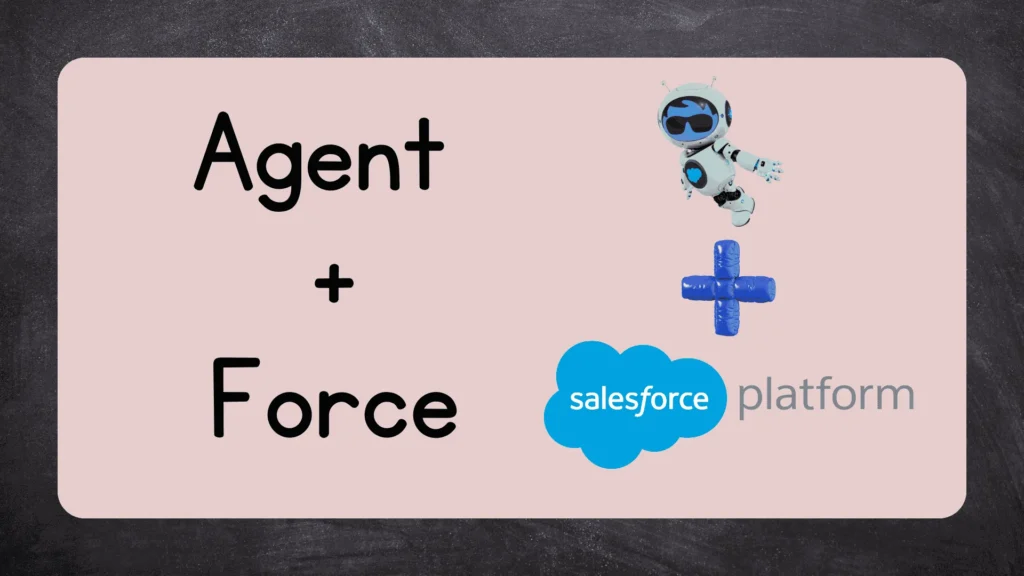
Agentforce is a combination of two words - Agent and Force,
Here Agent represents the AI Capabilities and Force signifying the salesforce platform. Together, AgentForce is a Salesforce agentic AI platform that allows users to build, customize, and deploy autonomous AI agents capable of handling tasks, making contextual decisions, and supporting workflows across the Salesforce ecosystem.


Salesforce AgentForce
Agent (Agentic AI) + Force (Salesforce Platform) = Agentforce

To make it clearer, Agentic AI is an artificial intelligence system that can accomplish a specific goal with limited human supervision. Agentic AI connects to enterprise data and uses sophisticated reasoning and iterative planning to solve complex, multi-step problems autonomously. It basically refers to a broader capability or architecture where AI agents can plan, reason, and act independently.


So, within the Salesforce platform, these agents can generate responses that are consistent with your brand’s voice and guidelines using trusted business data, including Salesforce CRM data and external data from Data 360. The AI agents can operate 24/7 across various platforms, like self-service portals and messaging channels. They can handle tasks proactively within set guardrails.


Example of AgentForce AI Agents in the Real World

To understand the concept of AI-powered agents in the Salesforce ecosystem, let’s understand one of the examples of how enterprises use them. Wiley, a publisher and leader in the research and learning space, struggled to handle service calls during peak times, like the start of a new semester. The increased number of calls overwhelmed the sales rep and agents.


So, Wiley utilized AgentForce to deploy AI agents that helped the customers resolve issues much faster than the company's previous chatbot. The AI-powered agents understood the context of each customer query by accessing CRM data, past interactions, and relevant knowledge articles.


Then, these agents handled routine service requests such as account access, subscription queries, and order-related issues without routing every interaction to a human agent. In cases of escalations or complex queries, the issue was handed over to the sales agent.


AgentForce increased efficiency by 40% and achieved a 213% ROI from its Service Cloud integration. Also, Wiley has integrated AgentForce AI at key points along the customer journey so users can get immediate, personalized, and dynamic support whenever they need it.


You understand what Salesforce AI AgentForce is and how it is helpful. Now, let’s focus on how it works within the Salesforce ecosystem.


How Salesforce AI AgentForce Works?

AgentForce is a platform that users can deploy pre-built agents or create their own agents using the out-of-the-box templates and familiar Salesforce tools, like Flows, Prompt Templates, Apex, and the Data Cloud.


AgentForce agents come with the Einstein Trust Layer for data protection and customized guardrails for enhanced control, and if the agents are integrated with Data Cloud, their responses and actions are based on organization’s unified, real-time business data.


If you want to understand how Data Cloud structures and activates this data layer, you can dive deeper into the Salesforce Data Cloud course.


Also, the AI agents don’t require pre-built conversational workflows, like Einstein Copilots. Using large language models and RAG (Retrieval Augmented Generation), the AI agents can dynamically understand user intent in natural language, retrieve relevant enterprise data, and generate appropriate responses or actions in real time.


The all-new Atlas Reasoning Engine is at the heart of AgentForce. It uses a series of prompts, code, LLM calls, and a set of three key building blocks (topics, instructions, and actions) to help agents understand and respond precisely.


Understanding the Three Levers that You Control to Make Agents Work

Topics, instructions, and actions are three important pieces of metadata that you define every time to build an agent with Salesforce. These elements work together to shape the agent's behavior and responses, ensuring that it aligns with your business objectives and user needs. Let’s understand them in detail:


Topics

Topics are the foundation of your agent capabilities, as you define what it can do and the type of user requests it can handle. Topics have a scope that tells the agent what it should and should not do within that specific topic area.


So, when a user sends a message, the agent first determines which topic or department should handle the request, and that department’s guidelines are followed, and tools are used to help the user.


Instructions

Instructions are the guidelines that you give to the agent to follow stringently. They direct the agent on how to handle the conversation within that specific department or topic, guide action selection, set conversation patterns, and provide the business context.


Instructions should be clear, specific, and actionable. Also, the topics should be clear and distinct to prevent overlapping, and the reasoning engine can correctly classify the user request.


Actions

Actions serve as the tools that your AI agent will use to complete the task at hand. Salesforce provides standard agent actions across different domains, like asset service management, automotive, B2B & B2C commerce, and more. If you want, you can create custom agent actions to expand your implementation.


Here is a table that explains a few of the defined actions in the Salesforce AgentForce ecosystem:


Action and what it does
Action Name What it Does?
Single Record Summary Use this topic if you want summary of any single record. This out of box topic can work on both standard and custom objects.
General FAQ This topic can read the knowledge articles and based on that provide answers to customers questions. The questions can be about the company and its products, policies or business procedures
Order Inquiries This topic can handle questions related to a user’s order, order status, or order updates
Case Management Handle care related inquiries, for example checking the status of a support case or updating case details. It can also create new cases on behalf of the user.

AI Agents that are Available on Salesforce AgentForce

Salesforce provides a range of pre-built AI-powered agents designed to be deployed for CRM automation, like:


  • Service Agents: Mainly to chat with external customers on platform like experience cloud, whatsapp, external websites etc. They can deliver personalized customer interactions by helping them on any inquiries. To use them a special user creation is must in salesforce.
  • Employee Agents:AI Agents that assist employees with internal queries, HR-related questions, and IT support, streamlining operations and improving productivity.
  • Optimized Campaigns: Improve your marketing ROI by targeting consolidated profiles with precision.
  • Agent for Setup: Agent that helps System Admins to Simplify administrative tasks related to Setup. Admins can customize it for to manage org.
  • Security Agent:Security Agent is for system admins to detect, investigate, and respond to anomalous security events in their org. In case of suspicious activities like unusual logins, data exports, or permission changes, the agent summarizes the alert, guides the user through an interactive investigation.
  • Channel Expert:Channel Expert is designed to assist users in navigating and utilizing various communication channels effectively. This agent is built by Slack.
  • Flow Automation Agent:For salesforce developers and admins this agent helps to explain the complex flow, making it easier to design and implement automated workflows.

The Action Behind Salesforce AI Agents:

Let’s understand how an AI-powered agent utilizes topics, instructions, and actions to get the work done:

Agentfore Topics, Instructions and Actions
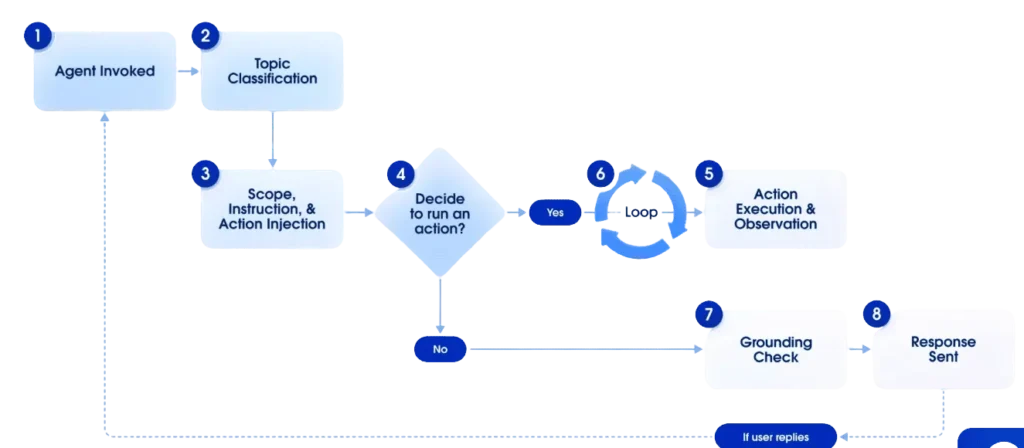
Flow Diagram of how Salesforce AI Agents Work

Step 1. Agent Invoked: A message or query is received from a user, or any event, data change, or API call, that invokes the agent.


Step 2. Topic Classification: The atlas reasoning engine analyzes the user’s request and classifies it under the most relevant Topic. If the query doesn’t belong to any Topic, the agent by default classifies it as off-topic.


Step 3. Scope, Instruction, and Action Injection: The scope, instructions, and actions associated with the topic are injected into the prompt along with the original user message and conversation history (typically the last 6 turns). This resulting prompt is sent to the LLM to help the agent decide what to do next.


Step 4. Agent Decision: The agent analyzes the resulting prompt and decides the next step, whether to run an action if specific information is needed, or a task needs to be performed or respond to the user if it has enough information or needs more context.


Step 5. Action Execution and Observation: The agent invokes a chosen action, the output from the executed action is captured, and the output, along with the original context, is sent back to the LLM.


Step 6. Agent Enters a Loop: Based on the output of the action, the agent enters a loop where it re-evaluates the situation based on new information (action output) and the ongoing conversation context. It decides if another action needs to be performed or formulates a response. This loop continues until the agent has enough information to respond.


Step 7. Ground Check: Before sending the final response, the agent runs a quick check to ensure the proposed response is grounded in the source information and adheres to the instructions as per the Topic. Also, it checks that the response is free from potential prompt injection risks and does not include hallucinated information.


Step 8. Send Response: The final, validated response is sent to the user. If the grounding step fails, the agent tries again, and if it is unable to produce a grounded response, then it sends a standard message saying that it cannot help the user with the request.


Using Conditional Filtering, users can add additional controls and add deterministic logic to the agentic workflow. It is like providing dynamic visibility rules for form fields, but for your agents when reasoning. It helps in improving the agent’s performance in two ways:


  1. Improve topic classification accuracy
  2. Enhance contextually appropriate action selection

Conclusion

AgentForce has the power to make a significant difference in enterprises’ workplace processes, customer experiences, and team productivity. Some IDC analysts say that AgentForce has the potential to take businesses into the next era of AI and bring more value than co-pilots.

As AI redefines Salesforce workflows, professionals should start working on building their AI skills without any delay. Professionals can enrol in the Zero to Hero Salesforce Agentforce to learn AI automation and prompt builders to deploy AI agents that make autonomous decisions and execute multi-step actions across Salesforce workflows.


FAQs

  1. How does AgentForce relate to Salesforce Einstein?
    The AgentForce is designed on Einstein’s predictive and generative AI capabilities.
  2. Which industries can benefit the most from AgentForce?
    Industries such as sales, finance, ed-tech, marketing, and healthcare can benefit the most from AgentForce, as they highly focus on enhancing customer experiences with their automated CRM capabilities.
  3. What will I learn by opting for your AgentForce course?
    Apart from getting hands-on experience with Salesforce’s Einstein tools, you will learn about how AgentForce revolutionizes customer interactions, Einstein Copilot studio, prompt builder and templates, and capabilities for Einstein for developers.
  4. Will AI agents replace human support teams?
    No, AI agents can perform automation, take independent decisions, and generate intelligent outcomes, but for more complex queries and tasks, human oversight will still be required.

back top