

The Headless 360 MCP Server is one of the most important Salesforce releases of 2026. It lets AI agents like Claude, ChatGPT, Cursor and Agentforce work directly with your Salesforce org, safely and with the permissions you already have. In this guide, you will learn what it is, how it works with a real example, how it compares to old-style integrations, how it powers the new AIforce, and how to get ready for it.
New to the concept? Start with our beginner guide: What Is Headless 360? Salesforce Headless 360 Explained.
Table of Contents
- What Is the Headless 360 MCP Server?
- How the Headless 360 MCP Server Works
- A Real-World Example, Step by Step
- Before MCP vs With the Headless 360 MCP Server
- The Other MCP Servers You Should Know
- Headless 360 vs AIforce
- Limitations and Risks
- How to Get Ready: 5 Practical Steps
- SFDC GYM Expert Tips
- Frequently Asked Questions
What Is the Headless 360 MCP Server?
The Headless 360 MCP Server is a Salesforce server built on the open Model Context Protocol (MCP). MCP is a common “language” that AI tools use to talk to other software, the same way USB is a common plug for devices. Salesforce announced the server in August 2026, and it is currently in open beta.
In simple words: instead of a developer building a custom integration for every AI tool, the MCP server gives any authorized AI agent one standard door into Salesforce. Through that door, the agent can find out what your org can do and then do it, within the rules you already set.
It is the centerpiece of Headless 360, Salesforce’s plan to make every part of the platform available as an API, an MCP tool or a CLI command, so work can happen wherever people and AI agents already are.
How the Headless 360 MCP Server Works
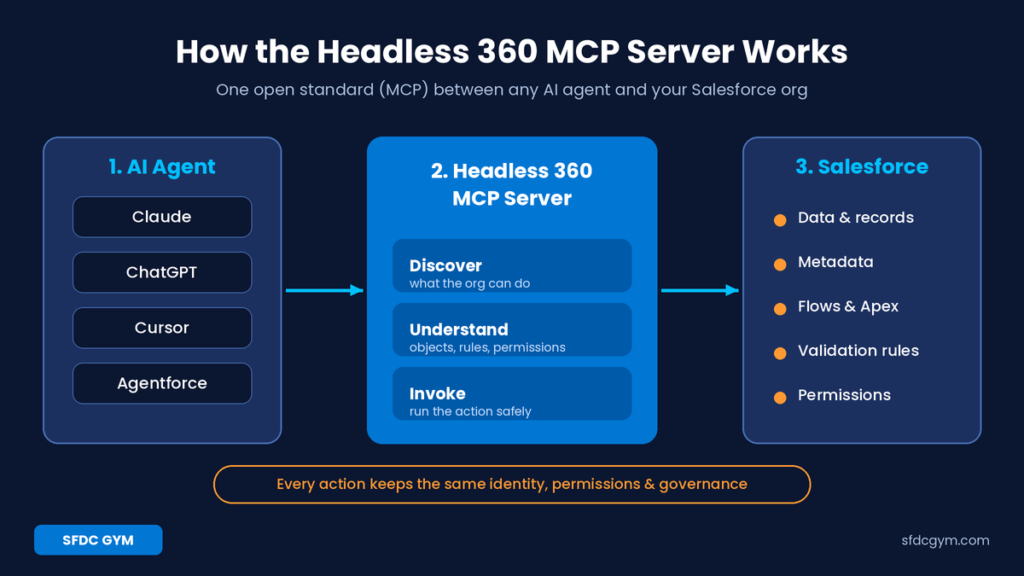
Think of it as a three-step loop:
- Discover: the AI agent asks what capabilities exist in your org, such as objects, flows and actions.
- Understand: because the server is metadata-aware, the agent also learns relationships, validation rules, workflows and permissions, not just raw endpoints.
- Invoke: the agent runs the action. Every action uses the same identity, permissions and governance you already set up in Salesforce.
This is the big difference from a normal API connector. Most MCP servers only expose APIs. The Headless 360 MCP Server exposes business capabilities, so your business logic stays in Salesforce instead of being rewritten inside prompts or custom code.
Salesforce lists Agentforce, Claude, ChatGPT and Cursor as examples of AI tools that can use it, along with other MCP-compatible platforms.
A Real-World Example, Step by Step
Let’s make this concrete with a simple sales scenario. A sales rep is working in Claude and types: “Move the Acme Corp deal to Negotiation and set the close date to the end of next month.” Here is what happens behind the scenes:
- Claude connects to the Headless 360 MCP Server as that rep, using their own Salesforce login.
- It discovers that the org has an Opportunity object with a Stage field and a Close Date field, and that updating opportunities is an available capability.
- It understands the rules. For example, your org may have a validation rule that says deals in Negotiation must have an amount. The agent learns this before acting.
- It finds the right record (Acme Corp) and makes the update through Salesforce, not around it.
- Salesforce enforces everything as usual: sharing rules, field-level security, validation rules and any flows that fire on stage change.
If the rep doesn’t have access to that opportunity, the action simply fails, exactly as it would in the Salesforce UI. Nobody had to write a custom integration, and no business rule was copied into a prompt.
Before MCP vs With the Headless 360 MCP Server
| Area | Before (custom integrations) | With the Headless 360 MCP Server |
|---|---|---|
| Connecting a new AI tool | New custom integration each time | One standard MCP connection |
| Business rules | Often re-coded in prompts or middleware | Stay in Salesforce and are respected automatically |
| Security | Integration users with broad access | Each action runs with the user’s own permissions |
| Discovering what’s possible | Developer specifies every object and API | Agent discovers capabilities in real time |
| Maintenance | Breaks when the org changes | Metadata-aware, so it follows org changes |
The Other MCP Servers You Should Know
The Headless 360 MCP Server is part of a bigger family. Here is a quick overview with status as announced in August 2026:
| Component | What it does | Status |
|---|---|---|
| Headless 360 MCP Server | Gives any AI agent trusted access to Salesforce capabilities | Open beta |
| Data 360 MCP Server | Exposes nearly 200 Data 360 APIs: segments, insights, data streams and more | Generally available |
| Slackbot MCP Client | Connects Slackbot to Salesforce and 20+ partner apps | Generally available |
| Agent Skills | 100+ reusable, governed skills that package business logic | Generally available |
| Headless Experience Layer | Build a UI once and render it on any surface | Open beta |
If you work with customer data, the Data 360 MCP Server is worth a closer look. With it, authorized agents can build segments, generate calculated insights and stand up data streams through natural language. Learn the basics first with our guides on Calculated vs Streaming Insights in Data 360 and Segmentation in Data Cloud.
Headless 360 vs AIforce: What Changed at Dreamforce 2026?
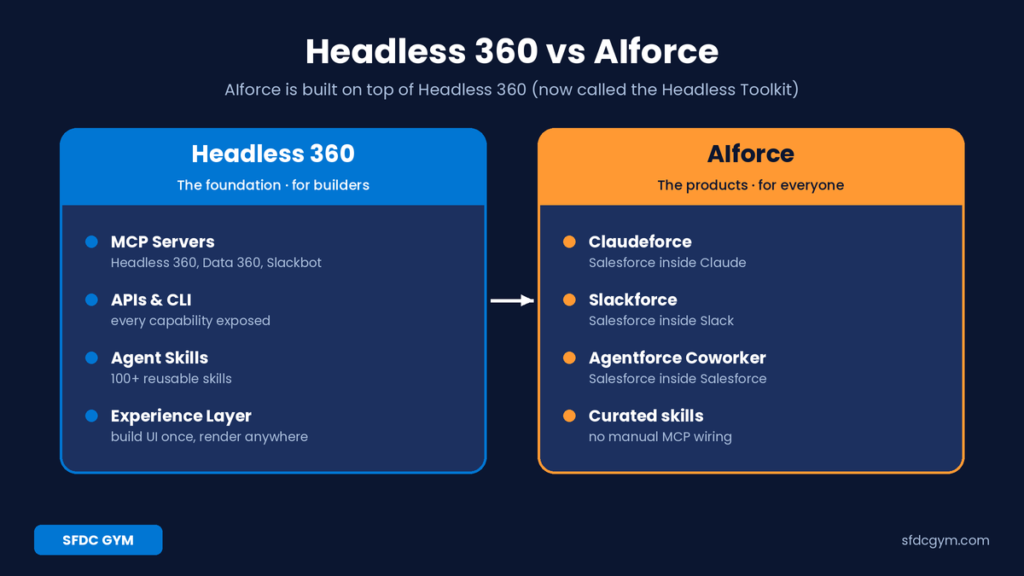
At Dreamforce 2026, Salesforce introduced AIforce. Many people asked: does this replace Headless 360? The short answer is no. AIforce is built on top of it.
- Headless 360 (now called the Headless Toolkit) is the foundation. It is the MCP servers, APIs, skills and experience layer that builders use.
- AIforce is the ready-to-use product layer for everyone. It includes Claudeforce (Salesforce inside Claude), Slackforce (Salesforce inside Slack) and Agentforce Coworker (inside Salesforce).
Why the extra layer? Wiring raw MCP servers and writing skills takes a technical person. AIforce packages curated skills and connections so business users can go “headless” without that setup. Developers and admins still need to understand the Headless 360 MCP Server, because it is what AIforce runs on.
Limitations and Risks to Know
The Headless 360 MCP Server is powerful, but it is not magic. Keep these points in mind:
- It is still in beta. Features, limits and behavior can change before general availability, so avoid building critical processes on it in production yet.
- Your permissions become your guardrails. If a user has more access than they need, an agent acting for them has it too. Messy permission sets are now a bigger risk.
- AI agents can misunderstand requests. For high-impact actions such as deleting records or changing pricing, keep a human approval step.
- Poor metadata means poor results. If fields have unclear names and no descriptions, agents will struggle to pick the right ones.
- Availability and pricing vary. Salesforce notes that packaging and availability depend on your product, region and contract, so confirm with your account team.
Why the Headless 360 MCP Server Matters for Your Career
- For developers: you will design skills, actions and metadata that AI agents use, instead of only building screens.
- For admins: permission sets, field descriptions and validation rules now directly control what agents can safely do.
- For architects: you decide which capabilities to expose, to which agents, and how to govern them.
How to Get Ready: 5 Practical Steps
- Start in a sandbox. The server is in open beta, so test before you touch production.
- Clean up permissions. Agents inherit user access, so follow least privilege.
- Improve your metadata. Clear object and field descriptions help agents understand your org.
- Pick one use case. For example, “update an opportunity stage from Slack or Claude.”
- Learn Agent Skills. Reusable skills are how you package business logic for any agent.
SFDC GYM Expert Tips
These are the practical habits we recommend to every learner working with Headless 360:
- Write field descriptions like you are explaining them to a new hire. AI agents read them, and a one-line description often makes the difference between the right field and the wrong one.
- Create a dedicated permission set for agent work. It is easier to review, audit and switch off than scattered profile changes.
- Test with “bad” requests too. Ask the agent to do something the user should not be allowed to do, and confirm Salesforce blocks it.
- Keep Prompt Templates and Agent Skills small. One clear job per skill is easier to reuse and debug than one giant skill.
Frequently Asked Questions
Not yet. It was announced in open beta in August 2026. The Data 360 MCP Server and Slackbot MCP Client are already generally available. Always check the latest Salesforce release notes.
No. Headless 360, now branded as the Headless Toolkit, is the technical foundation. AIforce is the set of ready-made products (Claudeforce, Slackforce and Agentforce Coworker) that run on it.
No. Every action inherits the identity, permissions, workflows and governance already defined in your org. If a user cannot do something in the Salesforce UI, an agent acting for them cannot do it either.
A normal API needs a developer to know exactly which endpoint to call. An MCP server lets an AI agent discover available capabilities on its own and call them in a standard way. The Headless 360 MCP Server also shares business context like validation rules and permissions.
Yes. Salesforce lists Agentforce, Claude, ChatGPT and Cursor as examples of AI platforms that can connect, along with other MCP-compatible tools.
Setting up and governing the server is technical work for developers, admins and architects. End users will mostly experience it through AIforce products like Claudeforce and Slackforce.
Start with Salesforce security basics (profiles, permission sets, sharing), then learn Prompt Templates, Agent Skills and how MCP works. Data 360 knowledge is a big plus if you work with customer data.
Key Takeaway
The Headless 360 MCP Server turns Salesforce into a set of trusted capabilities that any authorized AI agent can use. AIforce makes those capabilities easy for everyday users, but the MCP server is the engine underneath. Learning it now, while it is still in beta, puts you ahead of most Salesforce professionals.
Want hands-on practice? Join the SFDC GYM Headless 360 course and learn MCP, Agent Skills and Prompt Templates step by step.