Headless 360 is Salesforce’s new platform architecture, announced at TDX 2026, that makes everything in Salesforce available as an API, an MCP tool, or a CLI command. In simple words: you no longer need the Salesforce screen to use Salesforce. AI agents, Slack, Claude, ChatGPT, Microsoft Teams or your code editor can read and act on your Salesforce data and business logic directly, with the same security rules you already have.
Headless 360 in 30 Seconds
- What it is: A new way to access the whole Salesforce platform without its user interface.
- How you access it: APIs, MCP (Model Context Protocol) tools and CLI commands.
- Who uses it: AI agents, developers, and employees working in tools like Slack or Claude.
- When it launched: April 15, 2026, at TDX (TrailblazerDX) in San Francisco.
- What does not change: Your data, automation, permissions and sharing rules stay the same.
What Does Headless Mean in Salesforce Headless 360?
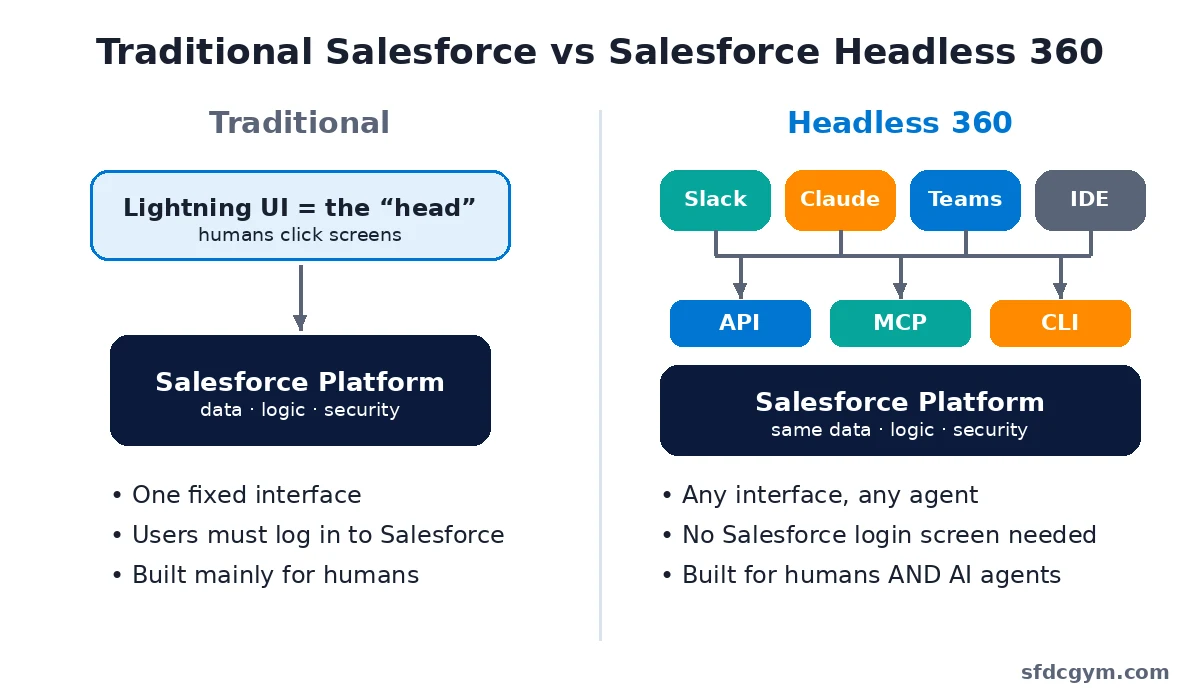
Think of any software as having two parts: a head and a body.
- The head is the user interface (UI) – the screens, buttons and pages you click in Salesforce Lightning.
- The body is everything behind the screen – your data, flows, Apex, security and business logic.
“Headless” means the body works on its own, without needing that one fixed head. You choose the “face”: Slack, a WhatsApp chat, an AI assistant like Claude, a custom React app, or a developer tool like Cursor. Salesforce keeps running quietly in the background.
The “360” connects it to Salesforce’s family of platforms, such as Customer 360 and Data 360. Headless 360 is the layer that opens all of them up.
Traditional Salesforce vs Headless 360
| Point |
Traditional Salesforce |
Salesforce Headless 360 |
| Main interface |
Lightning UI in a browser |
Any surface – Slack, Teams, WhatsApp, Claude, ChatGPT, IDE, custom apps |
| Main user |
Humans |
Humans and AI agents |
| Login to Salesforce screen |
Required |
Not required |
| How work is done |
Clicks and page layouts |
API calls, MCP tools, CLI commands |
| Security model |
Profiles, permission sets, sharing |
The same – inherited automatically |
How Does Salesforce Headless 360 Work?
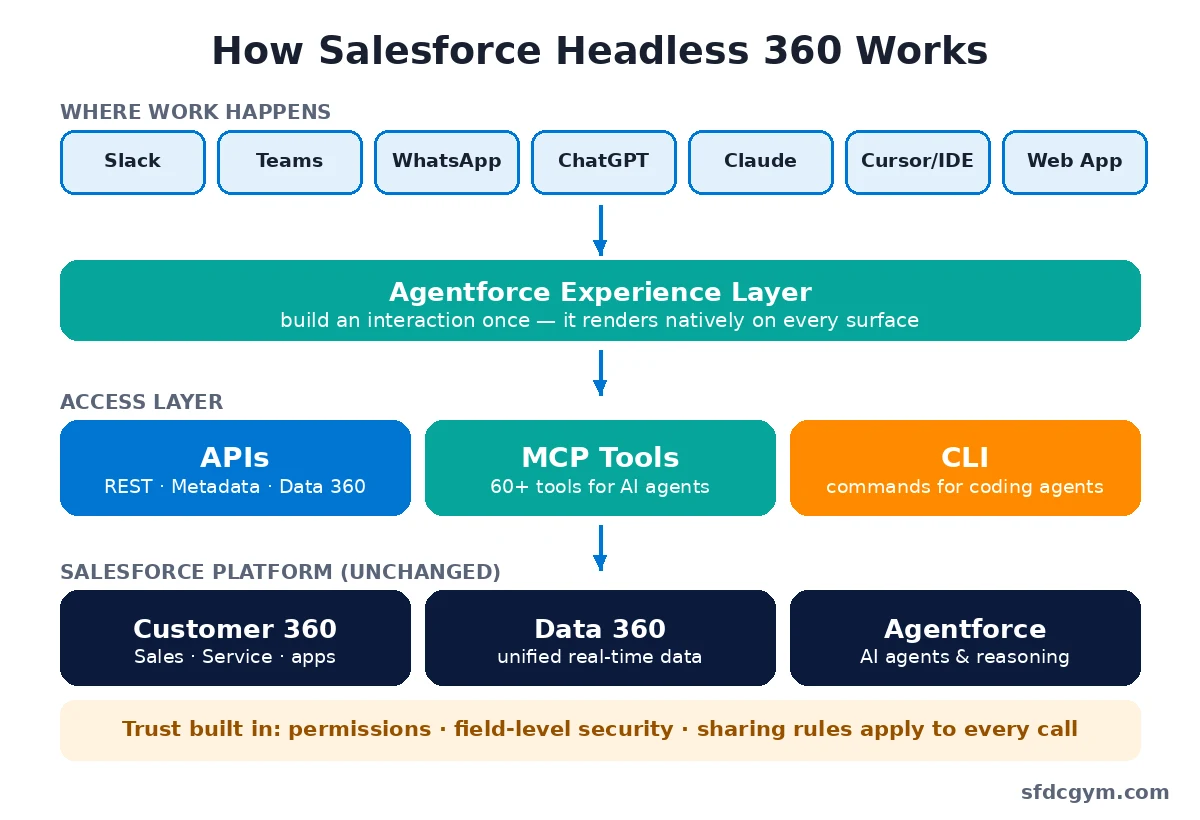
Headless 360 does not rebuild Salesforce. The platform underneath stays the same. What changes is that every layer now has a “door” that external apps and AI agents can walk through. There are three types of doors:
1. APIs: APIs are not new to Salesforce. The difference is scope: with Headless 360, the goal is that every capability is reachable through an API – not just records, but Data 360, metadata and agent features too.
2. MCP Tools: MCP (Model Context Protocol) is an open standard that lets AI assistants use external tools. Salesforce launched 60+ new MCP tools so AI models like Claude or ChatGPT can safely query data, run actions and build on your org.
3. CLI Commands: The Salesforce CLI is expanding so coding agents (like Claude Code or Cursor) can create, deploy and manage Salesforce components without anyone opening a browser.
The 3 Pillars of Headless 360
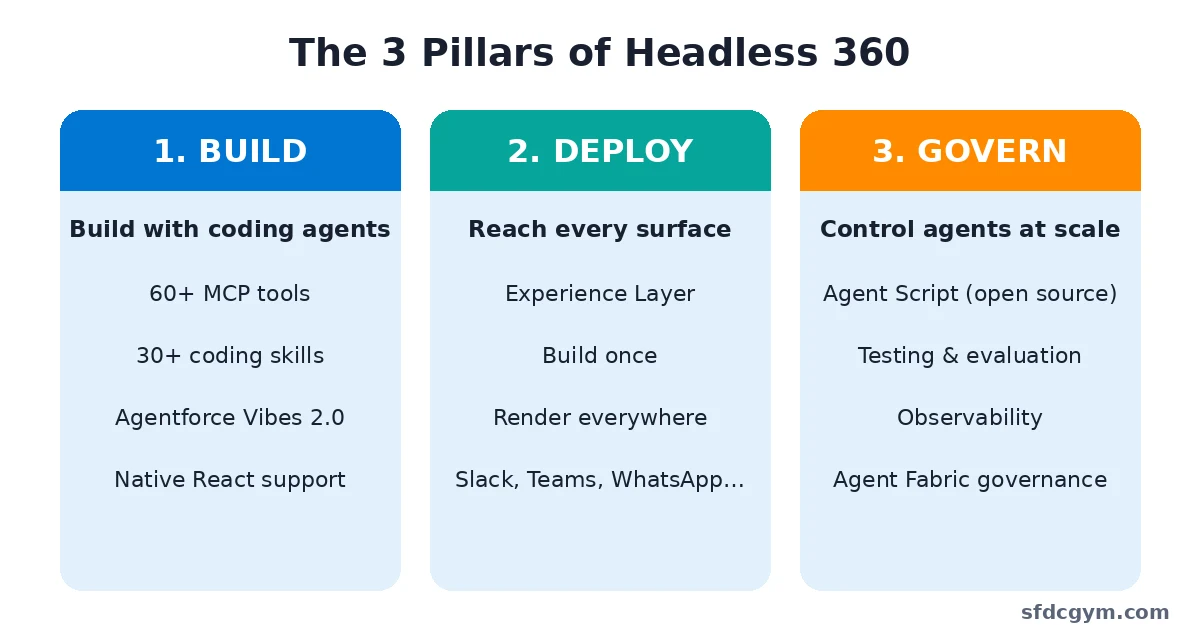
Salesforce grouped the Headless 360 launch into three big areas. An easy way to remember them: Build, Deploy, Govern.
Pillar 1 – Build with Coding Agents: Developers can build on Salesforce from the tools they already love. Headless 360 brings 60+ MCP tools and 30+ ready-made coding skills that give coding agents live access to your org. It also adds native React support for custom UIs, and Agentforce Vibes 2.0 – Salesforce’s AI coding partner that understands your org’s metadata.
Pillar 2 – Deploy on Every Surface: The Agentforce Experience Layer separates what an agent does from how it looks. You build an agent interaction once, and it renders natively in Slack, Microsoft Teams, WhatsApp, ChatGPT, Claude, Gemini, mobile or web.
Pillar 3 – Govern Agents at Scale: Shipping an agent is easy; controlling it in production is hard. Agent Script lets you decide which steps must follow strict business rules and which steps the AI can reason through freely. Salesforce has open-sourced Agent Script, and added tools for testing, evaluation and monitoring. Agent Fabric adds central control when you run agents from many vendors.
Why Did Salesforce Launch Headless 360?
Two simple reasons:
- Work has moved. People spend their day in Slack, Teams, email and AI assistants. Jumping into another screen to update a record slows them down. Headless 360 brings Salesforce to where the work already happens.
- AI agents don’t need screens. An agent doesn’t click buttons – it calls tools. To let agents do real work, Salesforce had to expose its 25+ years of business logic and security as tools agents can use directly.
The big idea: AI agents should act on your trusted business rules, not just on raw data. That is what makes Salesforce useful in the “agentic enterprise.”
A Simple Headless 360 Example
Imagine a sales rep named Priya working in Slack.
- Before: Priya opens Salesforce, searches for the opportunity, edits the stage, logs a call, then goes back to Slack.
- With Headless 360: Priya types in Slack, “Move the Acme deal to Negotiation and log today’s call.” An Agentforce agent updates Salesforce through MCP tools – checking that Priya actually has permission to edit that record.
Now a developer, Rahul, uses Claude Code in his editor. He asks it to create a custom field and deploy a Flow. The coding agent uses Salesforce MCP tools and CLI commands to build and deploy – Rahul never opens Setup.
Is Headless 360 Secure?
Yes – and this is the most important part. Agents working through Headless 360 inherit your existing Salesforce permissions, field-level security, sharing rules and workflows. If a user can’t see a field in the UI, an agent acting for that user can’t see it either. Salesforce runs the infrastructure, and trust is enforced on every call.
Does Headless 360 Replace the Salesforce UI?
No. Your users can keep working in Lightning exactly as before. Headless 360 simply adds more ways to use Salesforce – browser, voice, chat, AI agents or code. You get flexibility, not a forced migration.
Note: Not every feature announced under Headless 360 is generally available yet. Some are in beta, pilot or preview, so always check the latest Salesforce release notes before planning a project.
Who Should Learn Headless 360?
- Salesforce Developers – to build with MCP, CLI, React and coding agents.
- Salesforce Admins – to understand how permissions and data are used by agents.
- Architects – to design agent-ready, API-first solutions.
- Consultants – because clients are already asking about AI agents in Slack and Teams.
How to Start Learning Headless 360
Headless 360 FAQs
What is Headless 360 in Salesforce?
Headless 360 is Salesforce’s architecture that exposes the entire platform – Customer 360, Data 360 and Agentforce – as APIs, MCP tools and CLI commands, so apps and AI agents can use Salesforce without its user interface.
When was Salesforce Headless 360 announced?
Salesforce announced Headless 360 on April 15, 2026, at its TDX developer conference in San Francisco.
Do I still need to log in to Salesforce with Headless 360?
Not to the Salesforce screen. You can work from Slack, Teams, Claude, ChatGPT or your IDE. You still need a valid Salesforce user and permissions behind the scenes.
What is MCP in Headless 360?
MCP stands for Model Context Protocol. It is an open standard that lets AI assistants use external tools. Salesforce provides 60+ MCP tools so AI agents can safely work with your org.
Is Headless 360 the same as Agentforce?
No. Agentforce is Salesforce’s AI agent platform. Headless 360 is the bigger architecture that opens up all of Salesforce – including Agentforce – to any tool or surface.
Is Headless 360 only for developers?
No. Developers use it most directly, but admins, architects and business users benefit too – for example, by updating Salesforce records from Slack through an agent.
Is my data safe with Headless 360?
Agents follow the same permissions, field-level security and sharing rules as your users, so they can only see and change what they are allowed to.
Is Headless 360 generally available?
Partly. Some Headless 360 features are generally available, while others are in beta, pilot or preview. Check Salesforce release notes for the current status of each feature.