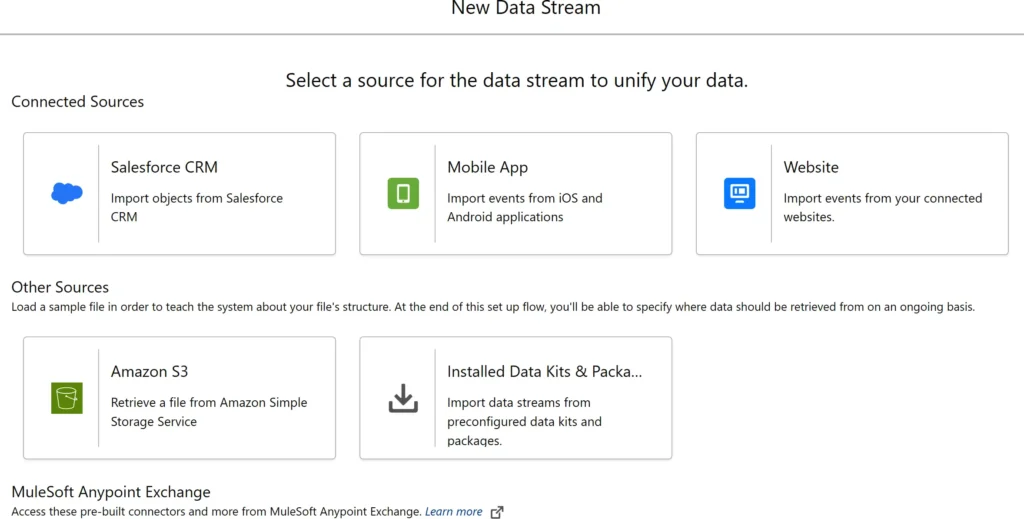
Once your dataset is structured, it’s time to import it into Salesforce CRM by creating a custom object.
- Log into your Salesforce Developer Org or Production Org.
- Navigate to Setup and search for Object Manager in the search bar.
Creating a new dashboard in Salesforce Data Cloud mirrors the process in Salesforce core, requiring you to name the dashboard and choose a storage folder. It’s crucial to note that using reports and dashboards in Data Cloud can affect billing consumption credits due to data storage and processing. Additionally, there’s a separate Reports tab available for further reporting needs.
Required Permission Set: Data Cloud Admin or Marketing Admin
You can create reports on one or more Data Model Objects (DMOs), allowing you to group, filter, and summarize records. Reports can be built from scratch or using available out-of-the-box templates. However, there are limitations: each report can display up to two thousand rows and supports a maximum of five row-level formulas. Custom report types on Calculated Insights (CIs) are not yet possible. Additionally, reports provide totals and subtotals for all included data, not just the visible records.
Required Permission Set: Data Cloud Admin or Marketing Admin
Data Action facilitates the execution of specific actions based on insights generated from data analyses. By defining Data Action Targets, businesses can automate responses to particular triggers, streamlining workflows and enhancing efficiency. This capability ensures that insights are not only informative but also actionable.
Required Permission Set: Data Cloud Admin, Marketing Admin, Marketing Data Aware Specialist, or Data Cloud Home Org Integration User
Einstein Studio in Salesforce empowers businesses to create and use AI models, offering both Predictive AI and Generative AI capabilities through its Model Builder. Users can build predictive models or connect external machine learning models from platforms like Amazon SageMaker and Google Vertex AI, integrating them with Data Cloud for operational use. Generative AI features include creating prompt templates and adding foundation models, with the ability to connect to large language models (LLMs) such as Azure OpenAI, OpenAI, Google Cloud Vertex AI, and Amazon Bedrock.
Required Permission Set: Data Cloud Admin, Marketing Admin, or Marketing Data Aware Specialist
In the world of data, establishing a unified identity is crucial for personalized experiences and accurate analyses. This capability focuses on merging disparate data points to create a single view of each customer
The identity resolution process in Salesforce matches and reconciles individual data to create unified profiles, utilizing rulesets for linking multiple data sources. Summary statistics for each ruleset are accessible in the Identity Resolutions tab. Before enabling identity resolutions, it’s necessary to complete data services mappings to the required Data Model Object (DMO) fields.
Required Permission Set: Data Cloud Admin, Marketing Admin, or Marketing Data Aware Specialist
All users can access Unified Individual and Account profiles via the Profile Explorer menu tab, which allows searches by name, email, phone, or ID. For effective use, DMOs for Individuals and Accounts must be mapped to data streams. The Profile Explorer dashboard provides a comprehensive view of unified customers, including behavioral and historical data. Data Cloud Admins can customize this view by adding or removing components like Profile Insights, Engagements, and Related Records using Salesforce Lightning App Builder.
Required Permission Set: Data Cloud Admin, Marketing Admin, Marketing Data Aware Specialist, or Data Cloud User.
The final core capability of Salesforce Data Cloud focuses on segmentation and activation, enabling businesses to target specific audiences with precision and impact.
Segments allow users to group customers based on shared characteristics or behaviors. By creating segments, businesses can tailor their marketing strategies to specific audience needs. This capability enhances the relevance and effectiveness of campaigns, driving higher engagement and conversion rates.
Required Permission Set: Marketing Admin, Marketing Manager, Marketing Data Aware Specialist, or Marketing Specialist.
Access to Salesforce Activations requires additional licensing, so if the menu option is unavailable, contact your Salesforce account executive. The activation process in Salesforce Data Cloud involves materializing and publishing a segment to an activation target, which necessitates information about the segment, the activation target, and the activation membership.
Required Permission Set: Marketing Admin, Marketing Manager, or Marketing Data Aware Specialist
Access to Salesforce Activation Targets requires additional licensing, and you may need to contact your Salesforce account executive if the option isn’t visible. Activation targets are locations where segment data is sent during activation, containing necessary authentication and authorization details. They allow data export in CSV or JSON formats to public clouds and are used in Adtech and Martech platforms like Google, LiveRamp, and Meta. Activation targets are supported by sharing rules, offering the flexibility to publish segments either manually or on a schedule.
Required Permission Set: Marketing Admin, Marketing Manager, or Marketing Data Aware Specialist