Data Cloud Key Capabilities & Insights
- February 9, 2026
- Posted by: SFDCGYM
- Category: Salesforce Data Cloud ,
Data Cloud Key Capabilities & Insights
In today’s data-driven world, harnessing the power of data is crucial for businesses. Salesforce Data Cloud emerges as a formidable system of reference, offering an array of tools to unlock the potential of your data. But before we explore its core capabilities, let’s start by understanding what a system of reference means.
What is a System of Reference?
A system of reference is a platform designed to view and analyze data without making alterations. Think of it as a lens through which you can see and understand your data better. Unlike systems of record, which can view, edit, create, and delete data (like the Salesforce CRM you’re probably familiar with), systems of reference focus on enhancing visibility and insight. These platforms are essential for businesses looking to gain deeper insights from their data without directly altering it.
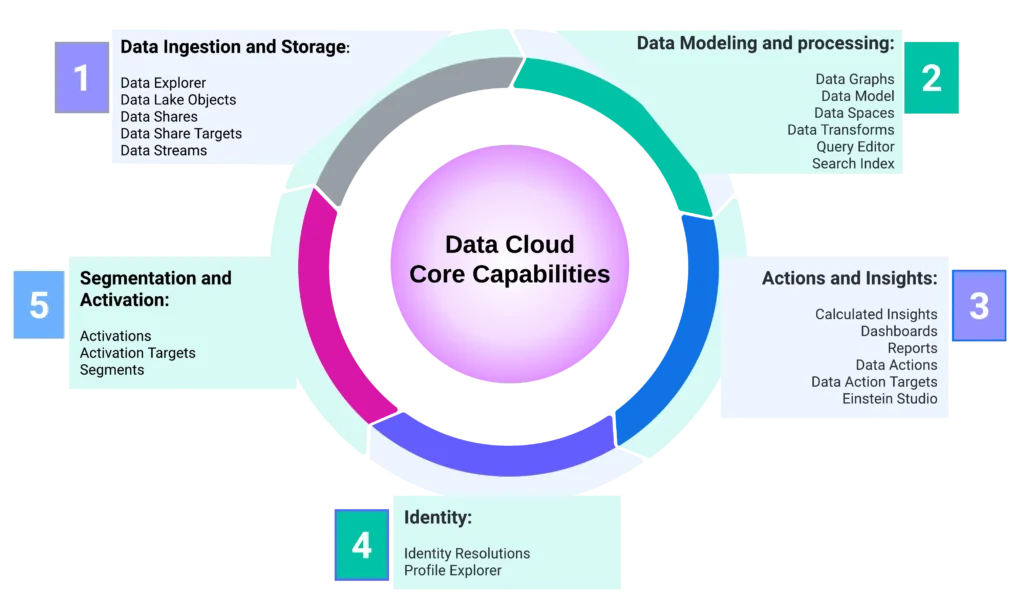
1) Data Ingestion and Storage
This capability ensures that data from various sources is efficiently collected and stored, providing a reliable foundation for analysis. Data ingestion is crucial as it brings together disparate data points to form a cohesive dataset. With seamless storage solutions, your data remains accessible and secure, ready for further processing and exploration.
A) Data Explorer
The Salesforce Data Cloud Data Explorer tool enables users to access and filter record-level data across various objects like DMO, DLO, or CI. It helps validate and edit data and formulas to ensure proper data stream functionality and correct data ingestion. Data Explorer is primarily used for visualizing and exploring data.
Required Permission Set: Data Cloud Admin, Marketing Admin, Marketing Data Aware Specialist, or Data Cloud User.
B) Data Lake Objects
Data Lake Objects act as repositories for your ingested data, providing a scalable and secure environment for storage. These objects enable businesses to store vast amounts of data without compromising accessibility or performance. By organizing data in structured formats, users can easily retrieve and analyze information when needed.
Required Permission Set: Data Cloud Admin, Marketing Admin, Marketing Data Aware Specialist
C) Data Shares and Data Share Targets
Data Shares facilitate seamless data exchange between different parts of your organization or even with external partners. By defining Data Share Targets, you can determine specific recipients for your shared data, ensuring that the right information reaches the right audience. This feature enhances collaboration and fosters data-driven decisions across teams.
Required Permission Set: Data Cloud Admin, Marketing Admin, or Marketing Data Aware Specialist
Zero Copy Technology in Data Share In Data Share, Salesforce Data Cloud employs zero copy technology, allowing federated access to external data sources such as Snowflake and Google BigQuery without actually ingesting the data. This approach enables direct data access and ensures efficient collaboration with external partners, maximizing data utility while maintaining privacy and security.
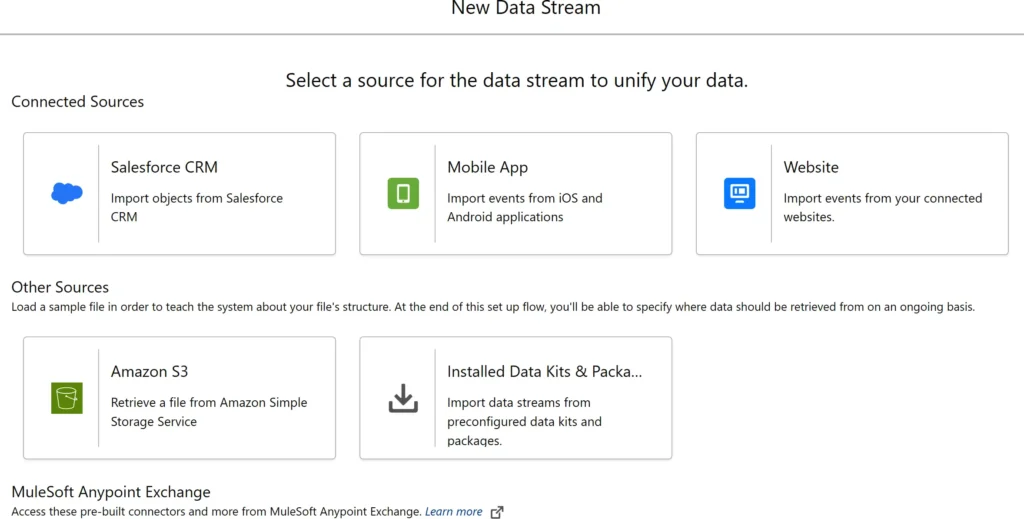
D) Data Streams
Data Streams allow real-time data flow into Salesforce Data Cloud, keeping your insights fresh and up-to-date. This capability is particularly valuable for businesses that rely on dynamic data inputs and need to respond quickly to changing circumstances. By integrating data streams, you can ensure that your analyses are based on current and relevant information.
Required Permission Set: Data Cloud Admin, Marketing Admin, or Marketing Data Aware Specialist
B) Dashboards
Creating a new dashboard in Salesforce Data Cloud mirrors the process in Salesforce core, requiring you to name the dashboard and choose a storage folder. It’s crucial to note that using reports and dashboards in Data Cloud can affect billing consumption credits due to data storage and processing. Additionally, there’s a separate Reports tab available for further reporting needs.
Required Permission Set: Data Cloud Admin or Marketing Admin
C) Reports
You can create reports on one or more Data Model Objects (DMOs), allowing you to group, filter, and summarize records. Reports can be built from scratch or using available out-of-the-box templates. However, there are limitations: each report can display up to two thousand rows and supports a maximum of five row-level formulas. Custom report types on Calculated Insights (CIs) are not yet possible. Additionally, reports provide totals and subtotals for all included data, not just the visible records.
Required Permission Set: Data Cloud Admin or Marketing Admin
D) Data Action and Data Action Targets
Data Action facilitates the execution of specific actions based on insights generated from data analyses. By defining Data Action Targets, businesses can automate responses to particular triggers, streamlining workflows and enhancing efficiency. This capability ensures that insights are not only informative but also actionable.
Required Permission Set: Data Cloud Admin, Marketing Admin, Marketing Data Aware Specialist, or Data Cloud Home Org Integration User
E) Einstein Studio
Einstein Studio in Salesforce empowers businesses to create and use AI models, offering both Predictive AI and Generative AI capabilities through its Model Builder. Users can build predictive models or connect external machine learning models from platforms like Amazon SageMaker and Google Vertex AI, integrating them with Data Cloud for operational use. Generative AI features include creating prompt templates and adding foundation models, with the ability to connect to large language models (LLMs) such as Azure OpenAI, OpenAI, Google Cloud Vertex AI, and Amazon Bedrock.
Required Permission Set: Data Cloud Admin, Marketing Admin, or Marketing Data Aware Specialist
4) Identity
In the world of data, establishing a unified identity is crucial for personalized experiences and accurate analyses. This capability focuses on merging disparate data points to create a single view of each customer
A) Identity Resolutions
The identity resolution process in Salesforce matches and reconciles individual data to create unified profiles, utilizing rulesets for linking multiple data sources. Summary statistics for each ruleset are accessible in the Identity Resolutions tab. Before enabling identity resolutions, it’s necessary to complete data services mappings to the required Data Model Object (DMO) fields.
Required Permission Set: Data Cloud Admin, Marketing Admin, or Marketing Data Aware Specialist
B) Profile Explorer
All users can access Unified Individual and Account profiles via the Profile Explorer menu tab, which allows searches by name, email, phone, or ID. For effective use, DMOs for Individuals and Accounts must be mapped to data streams. The Profile Explorer dashboard provides a comprehensive view of unified customers, including behavioral and historical data. Data Cloud Admins can customize this view by adding or removing components like Profile Insights, Engagements, and Related Records using Salesforce Lightning App Builder.
Required Permission Set: Data Cloud Admin, Marketing Admin, Marketing Data Aware Specialist, or Data Cloud User.
5) Segmentation and Activation
The final core capability of Salesforce Data Cloud focuses on segmentation and activation, enabling businesses to target specific audiences with precision and impact.
A) Segments
Segments allow users to group customers based on shared characteristics or behaviors. By creating segments, businesses can tailor their marketing strategies to specific audience needs. This capability enhances the relevance and effectiveness of campaigns, driving higher engagement and conversion rates.
Required Permission Set: Marketing Admin, Marketing Manager, Marketing Data Aware Specialist, or Marketing Specialist.
B) Activation
Access to Salesforce Activations requires additional licensing, so if the menu option is unavailable, contact your Salesforce account executive. The activation process in Salesforce Data Cloud involves materializing and publishing a segment to an activation target, which necessitates information about the segment, the activation target, and the activation membership.
Required Permission Set: Marketing Admin, Marketing Manager, or Marketing Data Aware Specialist
C) Activation Targets
Access to Salesforce Activation Targets requires additional licensing, and you may need to contact your Salesforce account executive if the option isn’t visible. Activation targets are locations where segment data is sent during activation, containing necessary authentication and authorization details. They allow data export in CSV or JSON formats to public clouds and are used in Adtech and Martech platforms like Google, LiveRamp, and Meta. Activation targets are supported by sharing rules, offering the flexibility to publish segments either manually or on a schedule.
Required Permission Set: Marketing Admin, Marketing Manager, or Marketing Data Aware Specialist

Conclusion
Salesforce Data Cloud stands as a testament to the power of data in driving business success. With its comprehensive core capabilities and user-friendly menu options, it empowers data specialists, Salesforce admins, Salesforce developers, and data analysts to harness the full potential of their data. From data ingestion and storage to actions and insights, each capability plays a vital role in transforming raw data into actionable intelligence.
By understanding the nuances of Salesforce Data Cloud, businesses can unlock new opportunities for growth and innovation. Whether you’re a seasoned data expert or just beginning your journey, Salesforce Data Cloud offers a platform where insights come to life, decisions are driven by data, and success is within reach.
If you’re ready to explore the world of Salesforce Data Cloud and elevate your data-driven strategies, reach out to our community of experts and fellow enthusiasts. Together, we can shape the future of data-driven business, one insight at a time.
Author: SFDCGYM
Leave a Reply Cancel reply
Summary Of this Article
In the ever-evolving landscape of data, Salesforce Data Cloud stands out as a powerful ally for businesses looking to harness the full potential of their data. Let’s dive into its five core features, each crucial for transforming your data into strategic insights. 🚀
1. Data Ingestion and Storage 📥🗄️
Efficiently gather data from numerous sources and store it securely with Salesforce Data Cloud. This feature ensures your data is not only accessible but also consolidated, providing a solid foundation for analysis.
2. Data Modeling and Processing 🔄📊
Transform raw data into structured formats ready for analysis. With tools like Data Graphs and Data Transforms, businesses can map relationships and refine data to extract meaningful insights.
3. Data Explorer 🔍🔑 Navigate through your data landscape with ease. The Data Explorer tool allows you to access and filter data, ensuring that your data streams are functioning correctly and efficiently.
4. Data Lake Objects 🌊🏢 Store vast amounts of data seamlessly. Data Lake Objects provide scalable and secure environments for your data, making retrieval and analysis straightforward and efficient.
5. Actions and Insights 🎯💡 Turn data into action! This feature focuses on converting data into actionable insights, empowering businesses to make informed decisions and drive growth through calculated insights and real-time metrics.
Salesforce Data Cloud’s core capabilities offer a comprehensive toolkit for businesses aiming to optimize their data-driven strategies and foster a community-driven approach to decision-making. 🌐🤝