Mastering Salesforce CPQ Quote Templates
- February 7, 2022
- Posted by: SFDCGYM
- Category: Salesforce CPQ ,
Mastering Salesforce CPQ Quote Templates for Seamless Sales Success
In today’s fast-paced business environment, delivering accurate and professional quotes quickly is crucial for maintaining a competitive edge. For Salesforce administrators and developers, mastering the configuration and generation of quote templates in Salesforce CPQ is essential. These templates not only streamline the sales process but also ensure consistency and professionalism in customer interactions. In this guide, we’ll explore the nuances of configuring and generating quote templates in Salesforce CPQ, providing valuable insights and practical tips along the way.
Understanding Quote Templates in Salesforce CPQ
Quote templates in Salesforce CPQ are powerful tools that allow businesses to present quotes in a standardized and visually appealing manner. They are customizable solutions that enable organizations to provide customers with detailed information about products, pricing, terms, and more.The Structure of Quote Templates
The Structure of Quote Templates
A quote template in Salesforce CPQ is meticulously divided into multiple parts, each of which is fully configurable to meet the unique needs of a business. This modular structure typically includes sections for headers, line items, terms and conditions, and optional product highlights. Each section can be tailored to display relevant data, align with branding requirements, and cater to specific customer preferences. By understanding and leveraging these configurable components, businesses can create cohesive and dynamic quotes that resonate with clients and drive sales success. This structured approach not only enhances organizational efficiency but also fosters a consistent and professional image across all sales communications.
Structure of Quote Templates
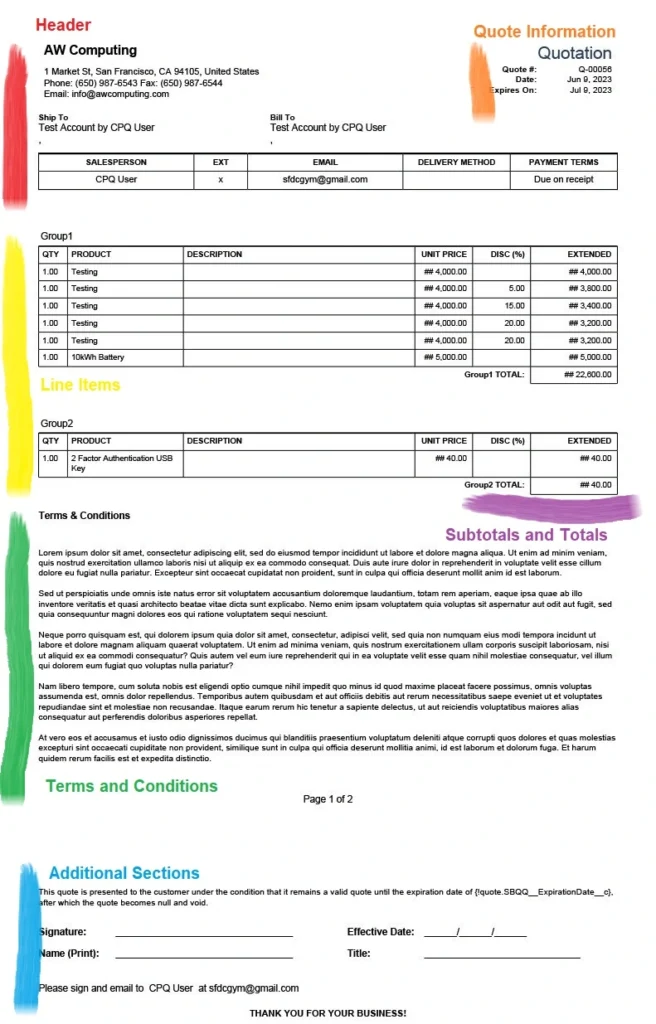
The structure of a quote template is composed of several key compones:
- Header: This section typically includes the company logo, address, contact information, and other essential details.
- Quote Information: Contains details specific to the quote, such as the quote number, date, expiration date, and customer’s information.
- Line Items: Lists products and services the customer is interested in, including product names, quantities, unit prices, total prices, and any applicable discounts.
- Subtotals and Totals: Provides subtotal calculations for all line items, including taxes, shipping charges, and other fees, with the grand total at the bottom.
- Terms and Conditions: Outlines contractual terms and conditions applicable to the sale, such as payment terms and return policies.
- Additional Sections: May include custom fields for unique product configurations, optional add-ons, or upsell opportunities.
Benefits of Quote Templates
Implementing quote templates offers numerous benefits, such as:
- Streamlined quote generation process
- Consistent presentation of information
- Professional appearance and branding
- Enhanced customer experience through clarity and transparency
Important Fields in Quote Template Configuration
Understanding the key fields in a quote template is essential for effective configuration:
- Template Name: Assign a name to your quote template for easy identification.
- Default: If checked, this template will be the default choice for new quote documents.
- Deployment Status: Set to “In Development” while building the template and change to “Deployed” once complete.
- Watermark ID: Provide the record ID of the watermark image for specific quote documents.
- Page Information: Customize formatting options, such as height, width, and margins.
These fields allow administrators to tailor quote templates to meet specific business requirements.
Steps to Create a Quote Template
Creating a quote template involves several essential steps:
- Access App Manager: Search for “Quote Template” in the App Manager and click “New.
- Template Configuration: Fill in values for Template Name, Deployment Status, Logo Document ID, Page Information, and more.
- Line Item Fields: Add quote line fields to display in the line item section.
- Additional Documents: Upload additional documents, such as PDFs, to accompany the quote template.
These steps enable businesses to craft comprehensive and customized quote templates.
Exploring Template Content in Salesforce CPQ
Template content is a fundamental aspect of Salesforce CPQ quote templates. It allows organizations to store specific data in quote sections and reuse them across multiple quote templates.
Template Content and Sections
- Template Content: Created to store specific data within quote sections.
- Template Sections: Used to position and style template content in the quote document.
- By understanding the relationship between template content and sections, businesses can efficiently customize their quotes to meet diverse customer needs.
Types of Template Content
Salesforce CPQ offers various types of template content, each serving a unique purpose:
- HTML: Ideal for custom requirements like cover letters and signatures.
- Line Items: Displays details about quote line fields, such as products and quantities..
- Quote Terms: Contains terms and conditions specific to the quote.
- Custom: Allows the inclusion of Visualforce pages within the quote template.
- Template Top: Functions like a document header, featuring logos and addresses.
- Template Bottom: Used for notes, signatures, dates, and more.
By leveraging these content types, businesses can create dynamic and informative quote templates.
Conclusion
In conclusion, configuring and generating quote templates in Salesforce CPQ is a crucial skill for CPQ administrators, Salesforce developers, and sales professionals. These templates streamline the quote generation process, ensure consistency, and enhance the customer experience. By understanding the structure, fields, and types of template content, organizations can create professional and customized quote templates that meet diverse business needs.
For those eager to explore further, consider reaching out to the Salesforce community or seeking additional resources to deepen your knowledge and expertise in Salesforce CPQ. With dedication and the right tools, you can optimize your sales processes and achieve seamless success in the world of Salesforce CPQ.

Summary Of this Article
🔄 Renewal Model Overview: Renewal models in Salesforce CPQ are essential for managing ongoing customer relationships. They guide how contracts or assets are renewed when their terms end.
Example: A renewal model helps a company with subscription services to automatically prepare for renewals, ensuring continuity and customer satisfaction.
Contract-Based Renewal Models:🧐
1.Focuses on subscription products.
2.Uses contracts to track details like quantity, start and end dates, and any changes.
3.Automates the creation of contract records once a sale is finalized, ensuring clarity and alignment between the sales team and customers.
Asset-Based Renewal Models:🛠️
1.Suited for non-subscription or physical products like machinery.
2.Utilizes asset records to monitor product ownership and maintenance needs.
3.Empowers sales reps to manage renewals efficiently, particularly in industries focused on tangible goods.
These models help businesses choose the right approach based on their product types and ensure a seamless, automated renewal process that boosts efficiency and customer loyalty.