
Have a question?
Message sent Close

Understanding Data Spaces in Data Cloud

Data Clouds have revolutionized how businesses manage, analyze, and store data. Within this comprehensive solution, Data Spaces emerge as an essential feature for implementing logical boundaries and maintaining data organization and control effectively. But what exactly are Data Spaces, and how can they enhance your data management practices? This blog dives deep into the concept of Data Spaces in the Data Cloud, explains their applications, and provides a step-by-step guide for creating and managing them.

What Are Data Spaces?

Data Space in the Data Cloud is a logical boundary that helps segment, organize, and secure various aspects of your data. Think of it as a virtual container within your Data Cloud environment. It allows administrators to control access and visibility of certain data objects, such as Data Lake objectsdata models, and other Data Cloud metadata. By using Data Spaces, you can create isolated environments, ensuring the security and relevance of data for specific users or purposes.

Why Should You Use Data Spaces?

Data Spaces offer organizations the ability to fine-tune data access and maintain security boundaries. Key uses include:
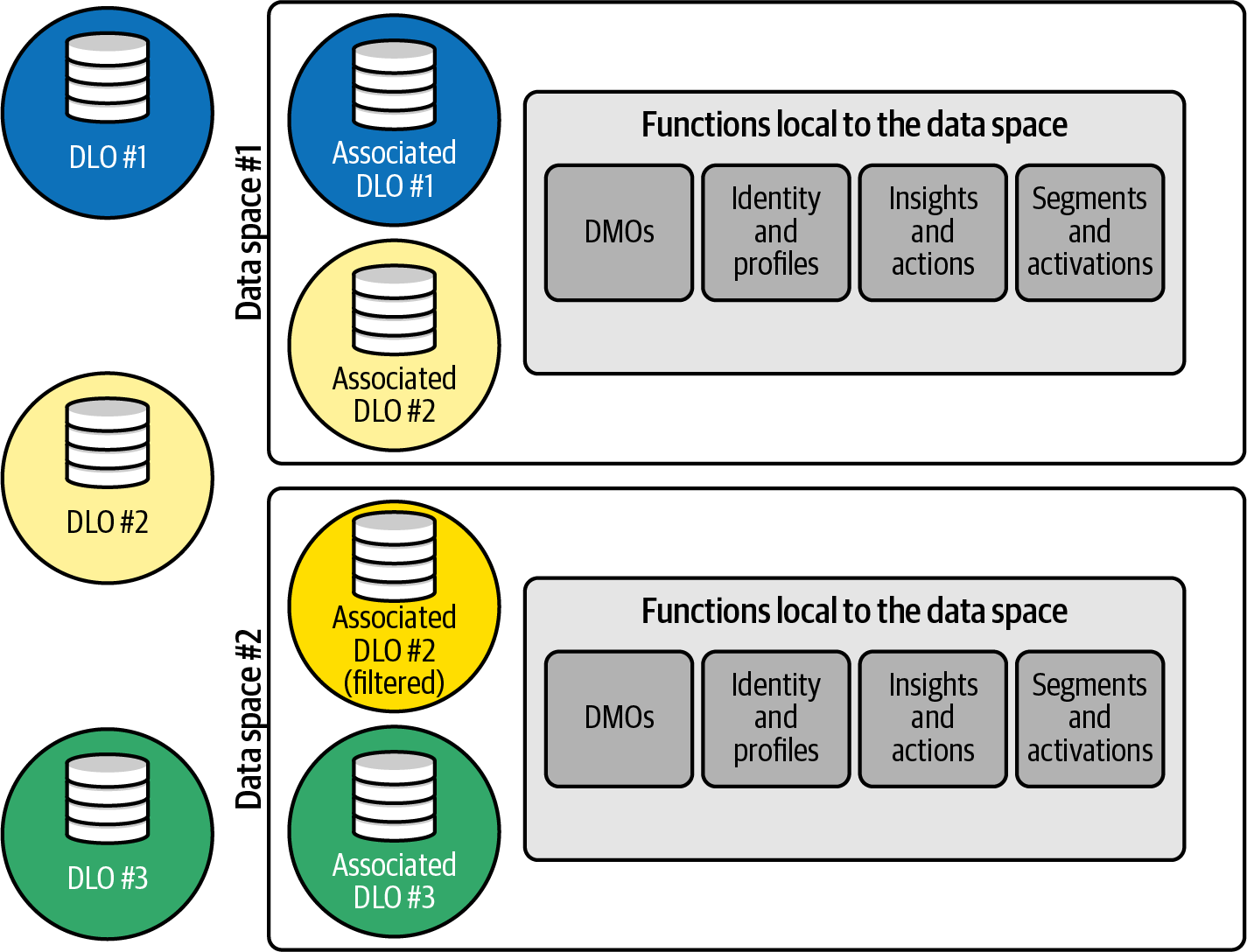
    • Hiding sensitive Data Lake objects and other data cloud metadata from unauthorized users.
    • Restricting visibility into data models that should only be accessed by specific teams.
    • Organizing Data Cloud metadata into manageable segments.
    • Filtering Data Lake objects (DLO) and assigning them to specific groups of users. This ensures that each user group receives access only to the data that is relevant to their roles, enhancing efficiency and minimizing the risk of unauthorized data exposure.
Data Filter using Data Space


For administrators dealing with large and complex databases, Data Spaces provide a crucial mechanism for maintaining order and access control within the Data Cloud framework.

Examples Where Data Spaces Are Required

To fully appreciate the utility of Data Spaces, consider the following examples:

  • Marketing Segmentation: A marketing team working on customer engagement campaigns might need access to a portion of customer behavior data. Using a Data Space, you can isolate this data without giving the team full access to other sensitive business data.
  • Departmental Data Isolation: A company’s HR department may need access to employee data without interfering with financial reports. Data Spaces can create a boundary between HR and finance data to prevent cross-access.
  • Multi-Tenant Environments: If your organization works with external contractors or business units, Data Spaces can be used to give each tenant access to their relevant data while restricting access to others’ data sets.

Steps to Create a Data Space in the Data Cloud

Creating a Data Space is straightforward when done via your Data Cloud platform. Follow these steps:
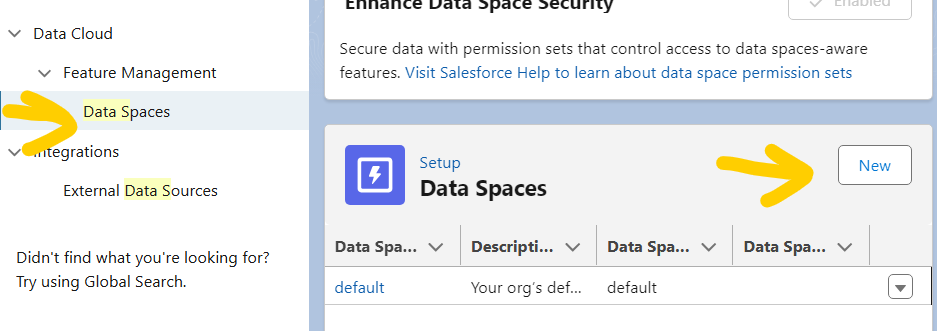
Data Space
  1. Access the Setup: Log in to your Data Cloud platform and navigate to the Setup section.
  2. Search for Data Spaces: Use the search bar to find “Data Spaces” and select the option.
  3. Create a New Data Space: Click the New button to start a new Data Space.
  4. Provide Key Information: Fill in details like the Data Space NameData Space Prefix, and a descriptive purpose. Save the form to finalize your new Data Space.

Once the Data Space is created, you can start organizing your data within its logical boundaries.

How to Control Access Using Data Spaces

Once your Data Space is set up, the next crucial step is to control who can access it. Access management is driven by Permission Sets within the Data Cloud. Here’s how you can assign permissions:

Permissions in Data Spaces
  1. Navigate to Permission Sets: Search for “Permission Sets” in the Setup menu.
  2. Select Relevant Permissions: Identify the specific permission sets, such as Data Cloud User or Data Cloud Data Space Management etc….
  3. Grant Access: Assign the selected Data Space to the appropriate permission set and save the changes to enable controlled access.

With Permission Sets, you can ensure that only authorized personnel can access or manage specific Data Spaces in your Data Cloud environment.

How to Control Access Using Data Spaces

Creating a Data Space is a high-level administrative task. To ensure the integrity and organization of your Data Cloud, System Administrators are the only ones authorized to create new Data Spaces. This restriction prevents unauthorized or unnecessary Data Spaces from cluttering the environment, keeping things streamlined and secure.

Who Can Add Data to a Data Space?

Adding data to an existing Data Space requires specific roles or expertise to ensure the integrity and organization of the Data Cloud. The following roles are authorized to add data:

  • Data Cloud Admins: Admins with overarching permissions to manage and organize data within the Data Cloud.
  • Data Cloud for Marketing Admins: Specialists responsible for managing data specifically used for marketing purposes.
  • Data Cloud Marketing Data Aware Specialists: Experts focused on handling marketing-related data securely and efficiently.

These roles make sure that only individuals with the appropriate rights and responsibilities contribute to the Data Space contents, maintaining the security and organization of your Data Cloud environment.

Final Thoughts on Data Spaces

Data Spaces in the Data Cloud are powerful for creating logical boundaries, securing sensitive data, and improving data organization. Whether you’re segmenting data for specific departments, maintaining privacy in multi-tenant environments, or optimizing accessibility, Data Spaces cater to the needs of modern organizations. Start leveraging Data Spaces today to enhance your data management and security strategies.

Summary Of This Article

🌟 Introduction

  • What is it? Streaming Data Transform enables real-time cleaning, enhancing, and analysis of data streams. It’s ideal for building smarter, real-time data pipelines.
  • Why it matters: It offers unmatched accuracy, flexibility, and the ability to transform raw streaming data into actionable insights as it flows into your system.

🔑 Core Features and Benefits

  • Clean Data Effortlessly: Remove null values, standardize data, and handle missing information effectively.
  • Get Insights in Real-Time: Apply advanced SQL operations like conditional logic and aggregation for immediate analysis.
  • Streamlined Transformation: Combine datasets, normalize structures, and optimize scalability using SQL-powered operations.

✏️ SQL Examples and Use Cases

  • Extract JSON Data: Use JSON_TABLE() to parse complex JSON into structured datasets for easier querying.
  • Handle Null Values: Techniques like ISNULL() and COALESCE() ensure complete datasets without gaps.
  • Standardize Data: Use LOWER() or UPPER() to ensure text consistency and TO_DATE() to convert dates properly.
  • Union Operations: Merge datasets with multiple phone numbers into normalized tables for efficient management.

⚡ Practical Tips to Maximize Streaming Data Transform

  • 🧼 Clean Early: Apply functions like TRIM()ISNULL(), and TO_DATE() as data arrives.
  • 🔄 Merge for Scalability: Use UNION to consolidate datasets and enhance workflow efficiency.
  • 📄 Document Everything: Clearly label custom transformations for debugging and team collaboration.
  • 🤝 Share Knowledge: Actively collaborate by sharing SQL queries within your team to fast-track processes.

🎯 Example SQL Queries

  • Assign Grades: Use the CASE WHEN statement to categorize data, like converting scores into letter grades.
  • Concatenate Fields: Merge first and last names in customer datasets with the CONCAT() function for full name creation.
  • Real-Time Filters: Extract key insights with queries filtering live streams, like purchases in the last hour.

🏆 Why Use Streaming Data Transform?

  • It’s a game-changer for Salesforce Data Cloud users, allowing seamless, real-time data transformation.
  • Helps simplify complex workflows, making data easier to analyze and use in downstream applications.

Data Clouds have revolutionized how businesses manage, analyze, and store data. Within this comprehensive solution, Data Spaces emerge as an essential feature for implementing logical boundaries and maintaining data organization and control effectively. But what exactly are Data Spaces, and how can they enhance your data management practices? This blog dives deep into the concept of Data Spaces in the Data Cloud, explains their applications, and provides a step-by-step guide for creating and managing them.

Data Space in the Data Cloud is a logical boundary that helps segment, organize, and secure various aspects of your data. Think of it as a virtual container within your Data Cloud environment. It allows administrators to control access and visibility of certain data objects, such as Data Lake objectsdata models, and other Data Cloud metadata. By using Data Spaces, you can create isolated environments, ensuring the security and relevance of data for specific users or purposes.

All Blogs